

Open a new enquiry
- On Home, paste the message in Start a trip and click Start.
- Or on Trips, click New enquiry.
- Build it step by step: answer a few questions about days, towns and nights.
- Start from a usual trip: pick a trip your company already runs.
- Plan it myself: build the route day by day.
Start from a usual trip
1
Open the usual trips
Click Start from a usual trip.
2
Filter the list
Under Days, pick Up to 5, 6 to 9, 10 to 14 or 15 or more. Under Type, pick a tour type. Or search with Search by name or town.
3
Pick a trip
Click a trip card. A short form opens.
4
Fill in what you know
Only Team is needed. You can also fill Who is it for?, First day, or month, Adults, Children and Currency.
5
Make the trip
Click Make the route and a first costing. The trip opens on Trip details.
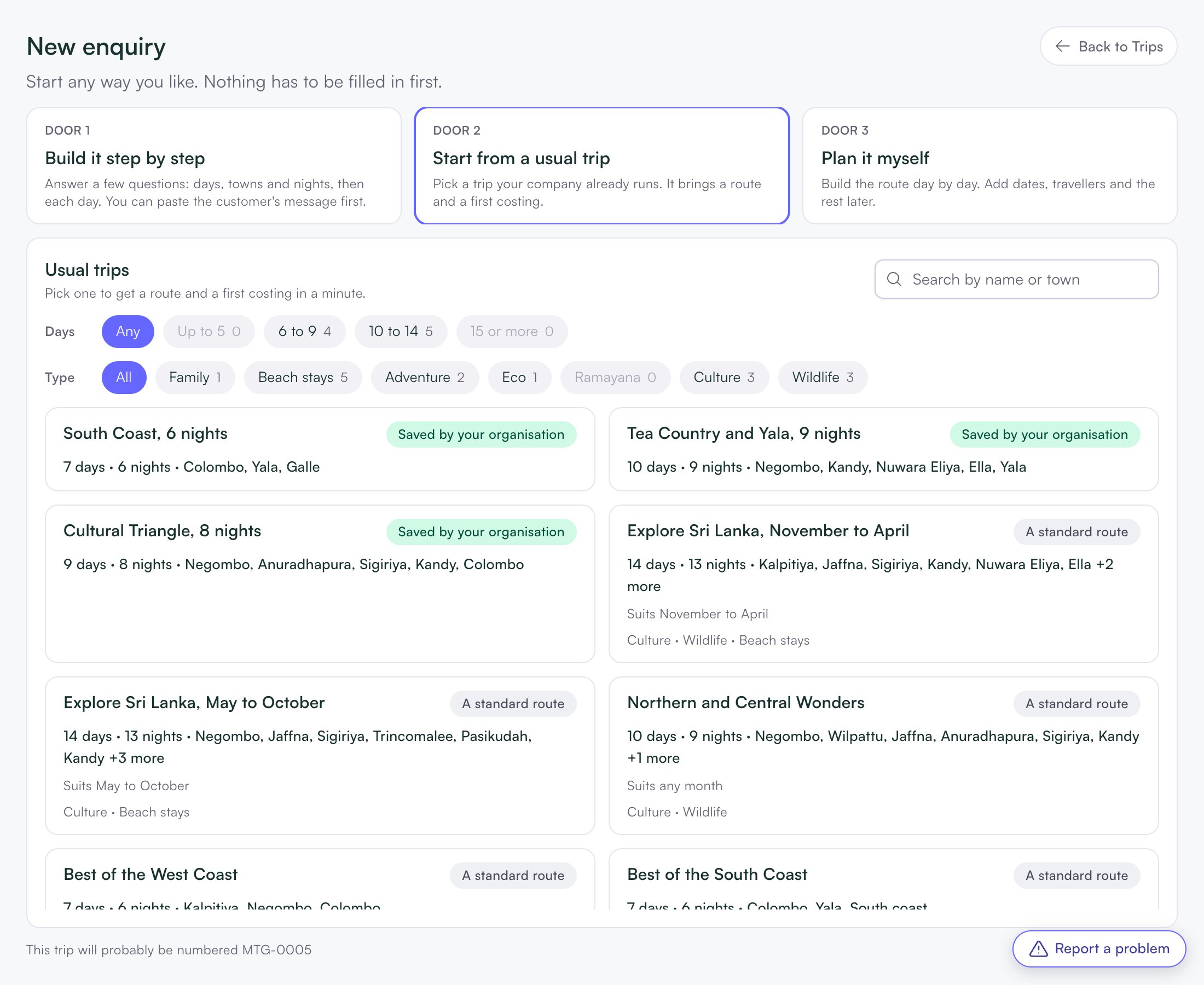
Cards marked Saved by your organisation come from your own trips. A standard route makes the route only, with no costing.
No dates yet?
You don’t need the exact day to start.- Month only: Localflow prices the trip as if it starts on the 1st of that month. Costing says, for example, “Priced for December 2026.”
- No date at all: hotel prices are estimates until you set the first day.