

Open the box
Click the party button in the header, for example 2 guests.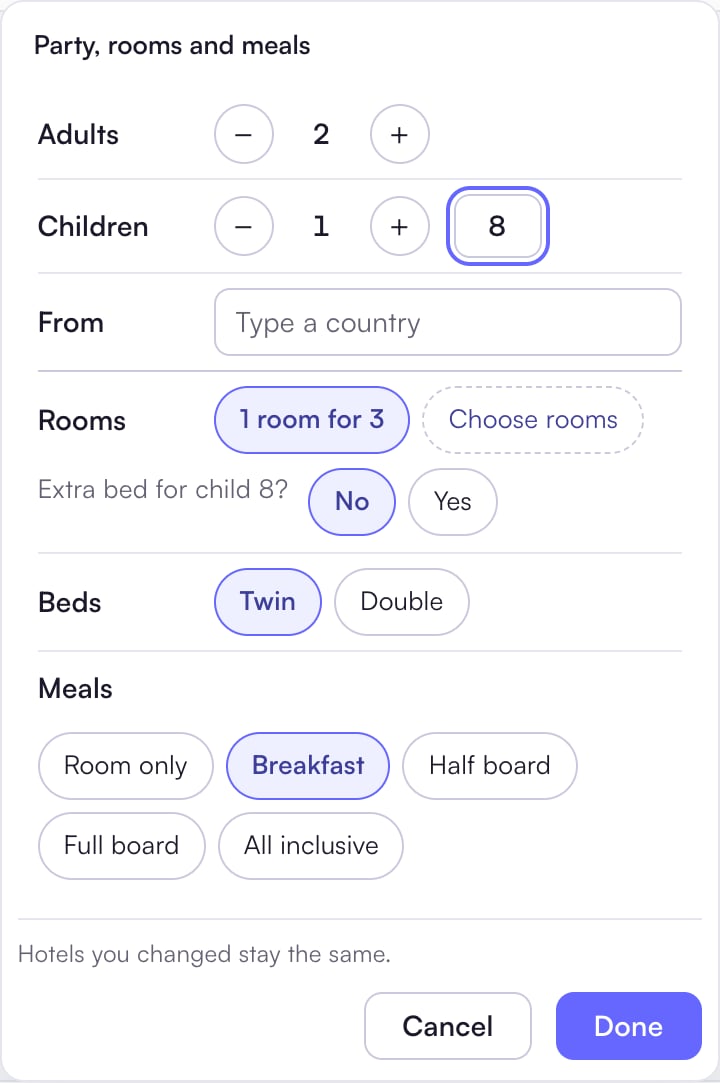
Change who is travelling
- Set Adults and Children with − and +.
- For each child, type the age in the box beside Children.
- In From, type their country.
- Click Done.
Rooms, extra beds, beds and meals
- Rooms: pick a choice such as 1 room for 3, or Choose rooms to set singles, doubles and triples.
- Extra bed for child 8?: Localflow asks for every child sharing with adults. No is the default. The hotel’s price list decides the child price.
- Beds: Twin or Double, for a room with two adults.
- Meals: Room only, Breakfast, Half board, Full board or All inclusive.
”Hotels you changed stay the same.” A hotel where you set the rooms or meals yourself keeps them.